 Sheetsa
Free
$0
Try the reading engine on a set of your own, today.
- Sheetsa Split: one named PDF per sheet, with a free account
- Sheetsa Specs: spec books split by CSI section
- Runs in your browser
For property owners and managers · early access
Every drawing set for every building, in one place you can search. When a tenant's architect asks for the base-building drawings, find the right sheets and send them in a few clicks. No more digging through shared drives or calling the original architect.
See it in two minutes
Why Sheetsa
Without Sheetsa
With Sheetsa
What the Sheetsa Library does
Drop in a set, several, or a whole project folder. Sheetsa reads every sheet's titleblock and files the set under its building. Scans too. Spec books, CAD and Revit files, photos and reports sit right beside the drawings.
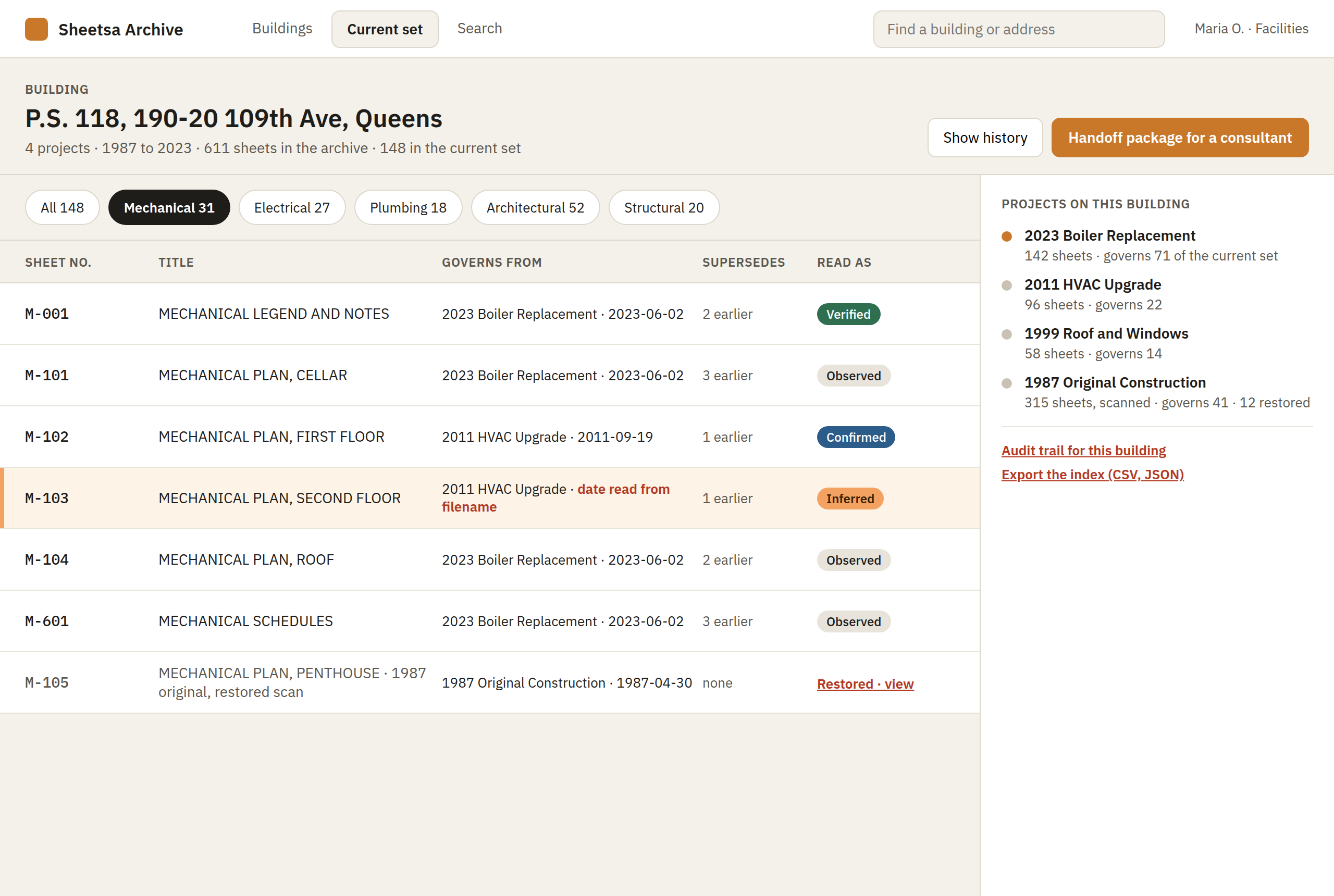
Search every set by sheet number, title or the words on the sheet. For each building, see which drawing is current and what it replaced, and catch missing sheets and duplicate sets before they cause trouble.
Tick the sheets and press Send. They get a link with no account to create and no giant attachments. You decide whether they can download or print, when the link expires, and you'll see when it was opened. Drawings coming the other way land in your Inbox.
A tenant request, start to finish
Requests like this usually mean an afternoon in a shared drive. In Sheetsa, it's a search and a send.
Type the floor or the sheet number. Every set for every building is searched at once.
Each sheet shows whether it's the drawing that governs, or what replaced it.
The package, its index and its transmittal are made for you. No zip files.
See when the link was opened and what was downloaded, until it expires.
Drawings coming in
Instead of a download link that expires in a week, send your consultant a link of your own. Their drawings arrive in your Inbox, and nothing is filed until you accept it.
One click in your Inbox makes a link to copy or email. It stays open for 30 days, and you can close it any time.
No account to create: they give their name and company, then drop files or a whole folder. Big files pick up where they stopped if the connection drops.
With the list of files and a transmittal, and the sender keeps a link to their own copy. If they use Sheetsa too, anything they send you comes straight to your Inbox.
Sheetsa reads the titleblocks and files each set under its building, asking if it can't tell which. Or decline it, and that's recorded too.
Accuracy you can see
Sheetsa doesn't guess quietly. Every sheet number, title, date and revision shows how it was read, so your team only reviews what's flagged. Every correction is saved for good, so a sheet only needs checking once.
Read straight off the titleblock.
Two independent reads agree: the text layer and OCR.
A best guess, flagged for a quick check.
Checked by someone on your team.
Old scans included
Most building archives are scans. Sheetsa reads them too, and checks its own work: OCR acts as a second reader, and where the two disagree, you'll see it.
Built for records teams
Sheetsa picks up where the project team leaves off. Once a set is issued, it's filed, kept current and ready to send for the life of the building. No CAD, Revit or digital twin needed.
Woman-owned, and built by an engineer with more than 20 years in the AEC industry. About Sheetsa →
Plans
Free
$0
Try the reading engine on a set of your own, today.
Sheetsa Archive Starter
$39/mo
200 sheets · Unlimited seats
A small Library for a team trying Sheetsa out.
For sets plotted from CAD or Revit. Scans, the current set and sending are in Archive.
Get started →Recommended
Sheetsa Archive
$149/mo
15,000 sheets · Unlimited seats · or $1,490 a year
Joined during early access? Email us for $99/mo, locked for your first year.
Every set kept, current, searchable and ready to send.
Sheetsa Archive Pro
Coming soon
25,000 sheets · Unlimited seats
Ask the archive a question and get an answer you can check.
Owners and agencies
Custom
Your whole archive · Unlimited seats
For portfolios with a legacy plan archive.
| Feature | Free | Starter | Archive | Archive Pro coming soon | Owners and agencies |
|---|---|---|---|---|---|
| Sheets included | — | 200 | 15,000 | 25,000 | Your whole archive |
| Seats | Unlimited | Unlimited | Unlimited | Unlimited | Unlimited |
| Split: one named PDF per sheet, with a sheet index you can correct and a missing-sheet check against the set's own drawing list | ● | ● | ● | ● | ● |
| Specs: spec books indexed and split by CSI section | ● | ● | ● | ● | ● |
| Design review: comments on the drawings, answered by your consultants through a link, back-checked and exported | – | ● | ● | ● | ● |
| The Library: every set filed by site and building | – | ● | ● | ● | ● |
| Search by sheet number, title or discipline | – | ● | ● | ● | ● |
| Your team's corrections saved; export to JSON and CSV | – | ● | ● | ● | ● |
| Convert: images combined into one PDF | – | ● | ● | ● | ● |
| Scanned sets indexed with OCR, checked by a second reading | – | – | ● | ● | ● |
| Search by project or the words on the sheet | – | – | ● | ● | ● |
| Current set per building, and what each drawing supersedes | – | – | ● | ● | ● |
| Send sheets with a link and a transmittal | – | – | ● | ● | ● |
| Schedules read into tables | – | – | ● | ● | ● |
| Spec books and other files kept in the Library | – | – | ● | ● | ● |
| Roles, an activity log and retention periods | – | – | ● | ● | ● |
| Scan restoration and multi-pass OCR | – | – | ● | ● | ● |
| PDF/A check of any PDF, with a quick fix for the common problems | With an account | ● | ● | ● | ● |
| Ask in plain words, with every answer citing its sheets | – | Early preview | Early preview | ● | Early preview |
| Your own SharePoint library, connected self-serve | – | – | – | ● | – |
| Assessment of a sample of your archive, with an accuracy report | – | – | – | – | ● |
| Your existing archive moved in, organized by site and building | – | – | – | – | ● |
| Integration with your repository, single sign-on, your own cloud | – | – | – | – | ● |
Every plan includes unlimited seats: everyone in your organization, and everyone you send a package to, at no per-user charge. Spec books are included free and never count toward your sheet limit. Prices are per organization and charged monthly or yearly by card through Stripe; you can cancel any time by writing to support@sheetsa.com.
On the way
Free tools
Sheetsa Split is free and runs on the same reading engine as the Library. Sign in, drop a drawing set, and watch every sheet get named from its titleblock, with a read state on every field. With a plan, the set lands in your Library, filed under its building.
 Free · Drawing sets
For a drawing set, or a whole folder of them. One PDF per sheet, named from its titleblock, with a sheet index you can correct before you download. Scanned titleblocks are read too.
Open Split → Free · Spec books
For a spec book or project manual. Indexed by CSI MasterFormat section and, if you want, split into one PDF per section. No account needed.
Open Specs → Archive plan · Scans
The scan tools. Restore a faded scan and read it with multi-pass OCR that says how sure it is, with an Archive plan. Check any PDF against PDF/A and fix the common problems with a free account; in the Library, fix a sheet or a whole set in place.
Open Archive → Paid plans · Images
Have scanned images instead of a PDF? Combine TIFF, JPEG, PNG, GIF, BMP or WebP images into one PDF, with a quick read of each sheet's titleblock. Included with every paid plan.
Open Convert →Drop in one of its drawing sets with Sheetsa Split and watch every sheet get named from its titleblock. It's free. When you're ready for the Library, write to support@sheetsa.com and we'll set up your plan, at the early-access price of $99/mo locked for your first year. Questions, or want a walkthrough first? Same address.
If something isn't working, tell us which app, what kind of file, and what you expected to happen. A screenshot of the sheet index helps more than the drawings themselves.