Sheetsa Archive · early access

Plans in.
Answers out.

A hosted repository for your drawing sets that reads every sheet, old scans included, and keeps a record of how each value was read. Find the current set for a building, hand a consultant exactly what they need, and ask the archive a question it can answer with sources.

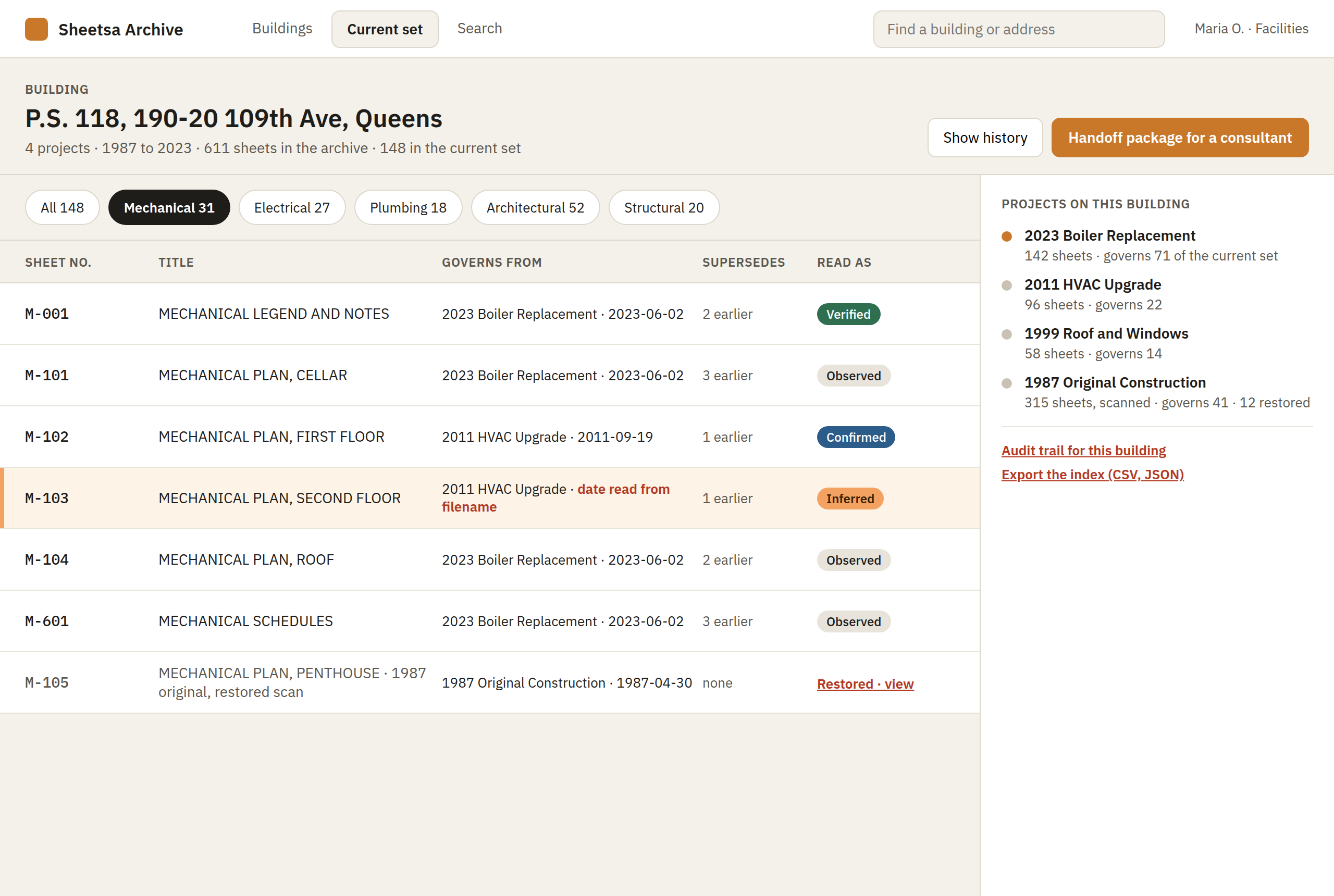
Design preview of Sheetsa Archive's current-set screen: one building, its projects from 1987 to 2023, and for each sheet number the drawing that currently governs, what it supersedes, and how it was read.
Sheetsa Archive, current set for a building · design preview, example data

What Sheetsa Archive does

The archive that explains itself.

Every sheet indexed from what's printed on it

Upload a set and Sheetsa reads each titleblock: sheet number, title, discipline, issue date, revision. Born-digital sets read from the text layer; scans read with OCR that gets a second opinion. Each value carries a read state, and a person can correct any of them once.

The current set for any building

For every sheet number, the drawing that governs today, which project it came from, and what it supersedes. Schedules read into tables, so a pump or a panel is searchable by its tag. One button builds a handoff package for a consultant: a link to exactly the sheets they need, with download and print access you control.

Answers with sources, with Archive Pro

Ask in plain words and get the answer with the sheets it came from. Quick and accurate because the ingesting and indexing are already done: the AI reads Sheetsa's finished index and evidence log, not raw PDFs, so every answer can be checked.

As designed

Restore, search, hand off.

Design previews of Archive and Archive Pro, in development for early access. The building, project and sheet names are examples.

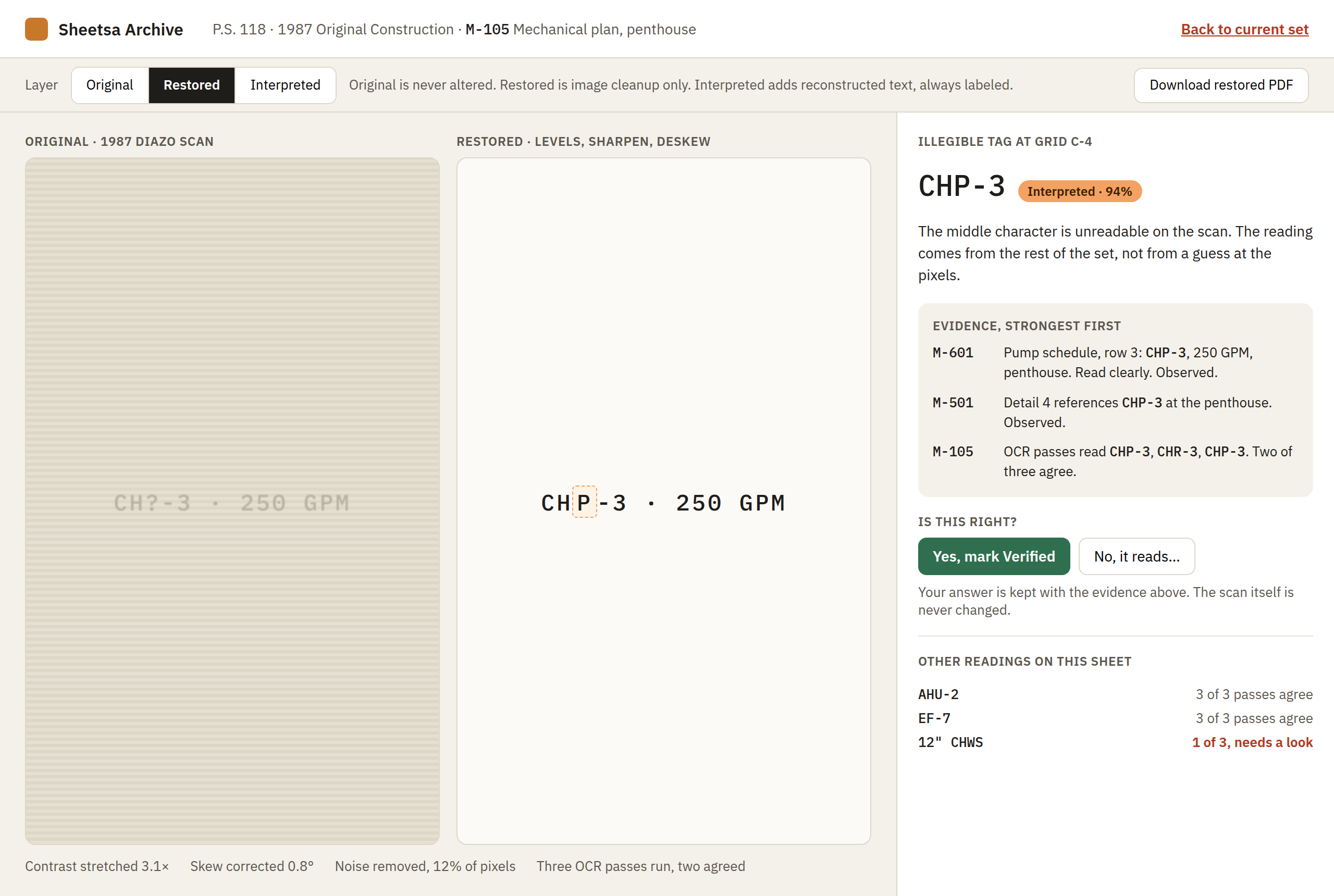
Design preview of Archive's restore screen: a faded 1987 scan beside its restored copy, and an illegible equipment tag reconstructed from the pump schedule and a detail on other sheets, with the evidence listed.
Restore, then reconstruct. The original scan is never altered. Where a tag is unreadable, the reading comes from the rest of the set, with the evidence listed and a person's answer kept.
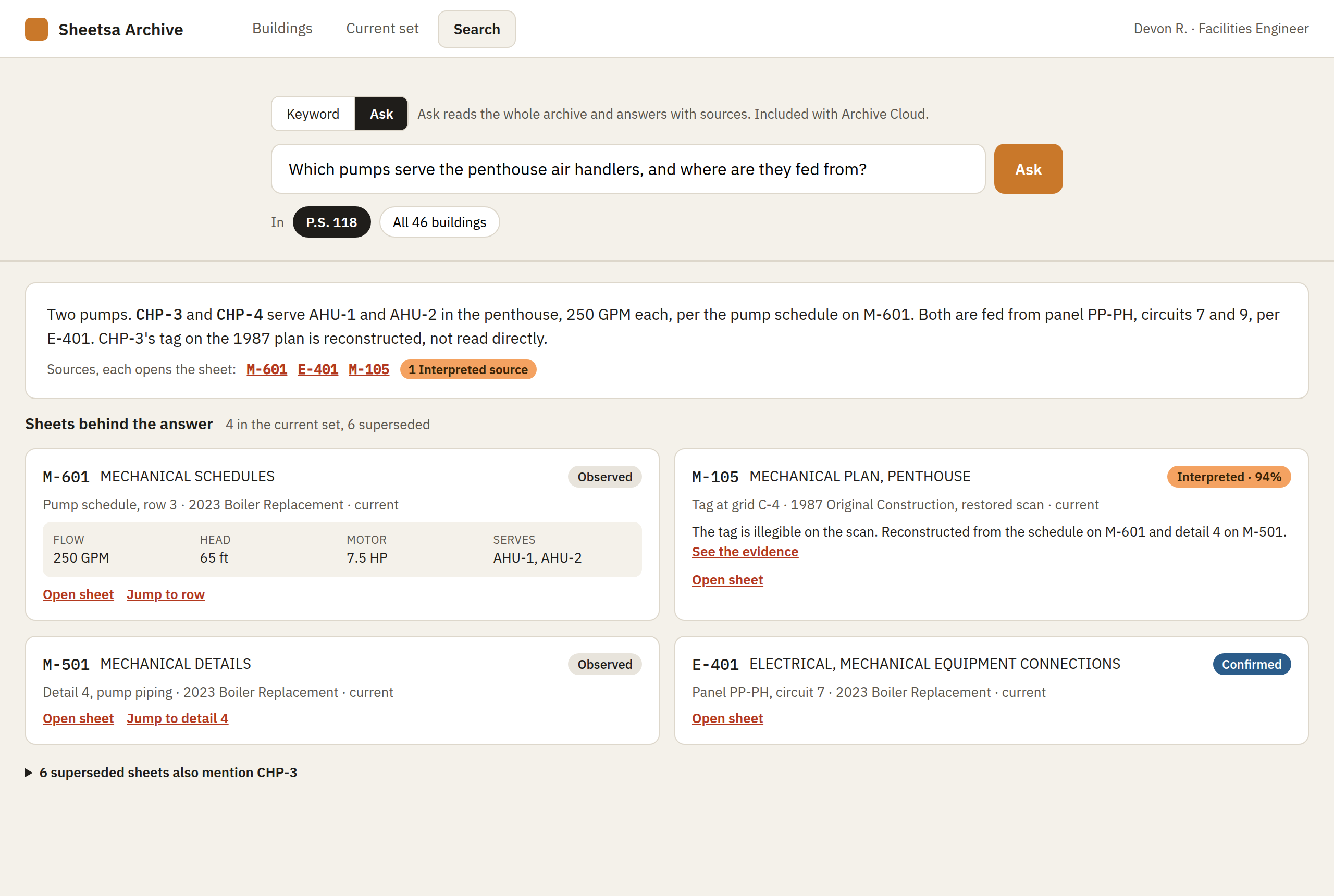
Design preview of Archive Pro's search screen: a question about which pumps serve the penthouse air handlers, answered with the sheets it came from, each marked with its read state.
Archive Pro: search that shows its sources. Ask a question across a building or the whole archive and get the answer with the sheets behind it, each carrying its read state.
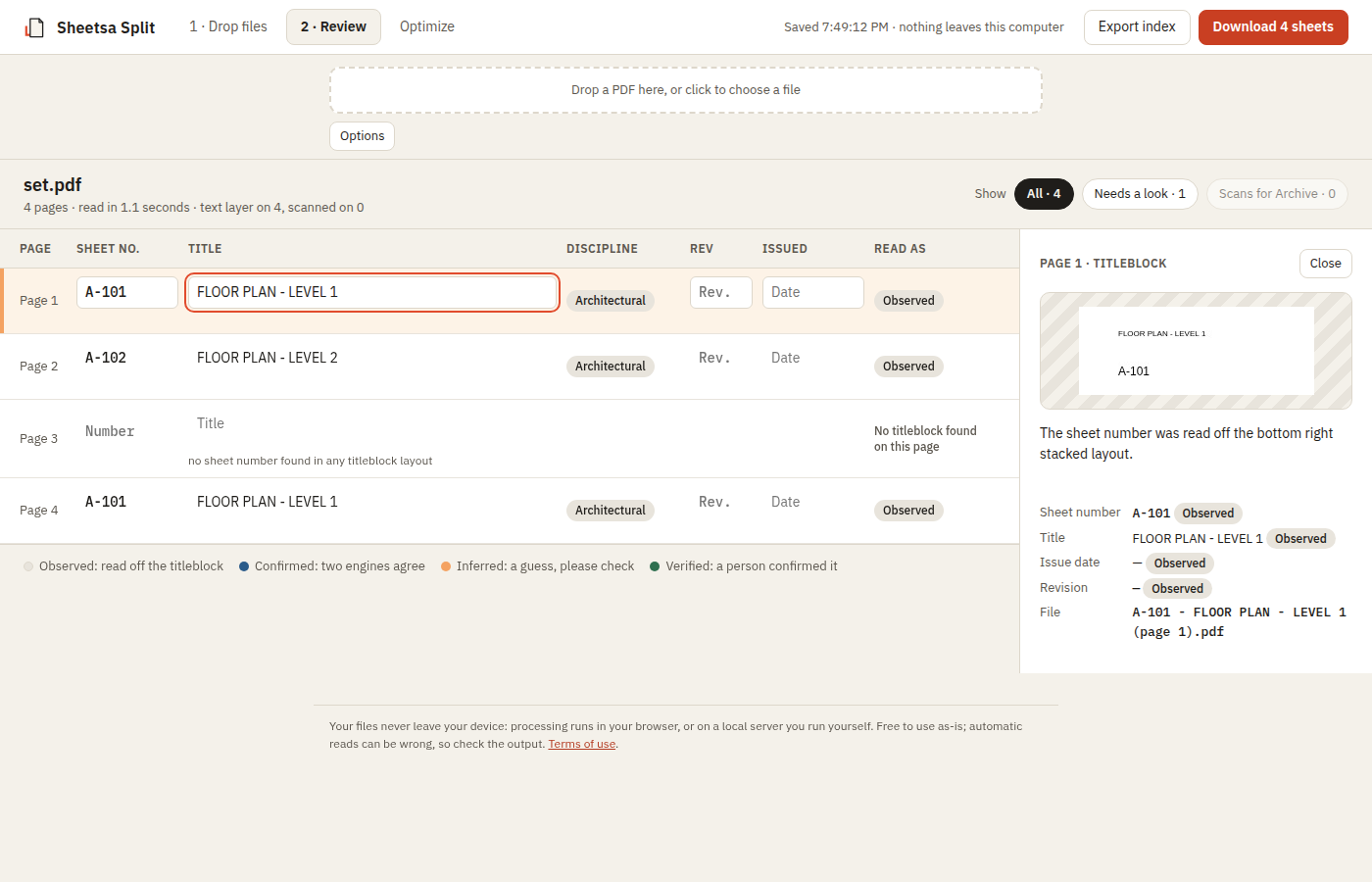
The Sheetsa Split review screen, the real product on a test set: each sheet's number, title and discipline read from its titleblock with a read-state label, and the titleblock the selected sheet was read from.
The review screen. This is Sheetsa Split on a test set: the same reading engine and read states Archive is built on. Try it below.

The record behind the record

Every field shows how it was read.

Sheet number, title, issue date and revision each carry a visible read state. Your team reviews and corrects the index, and every read and correction is kept in an append-only log, so a sheet is only checked once.

Observed

Read directly off the titleblock.

Confirmed

Two independent readers agree: the text layer and OCR.

Inferred

A looser guess. Please check it.

Verified

A person confirmed or corrected it.

OCR that checks its own work

Reading what the text layer can't.

Most tools run OCR once and trust the answer. Sheetsa treats OCR as a second, independent reader and records where the readers agree and where they don't.

  • A second opinion on weak reads. When a sheet's text layer gives an uncertain answer, Sheetsa renders just the titleblock corner and reads it again with OCR. If both readers agree, the field is marked Confirmed.
  • Drawings with no real text. Some CAD plots draw every letter as lines, so there is no text to select. OCR reads the pixels instead, so those sheets still get named.
  • Three readings of every old scan. Archive reads a page as scanned, contrast-stretched, and in black and white, then reports line by line how many of the three agree.
  • Next: scanned sets, indexed. Reading the sheet number and title straight off a scanned sheet. It reads sample scans cleanly at scanner resolution; real archive scans are the next test.

Plans

Start free. Keep everything with Archive.

Free

$0

Try the reading engine on a set of your own, today.

  • Sheetsa Split: one named PDF per sheet and a sheet index you can correct
  • Sheetsa Specs: spec books indexed and split by CSI section
  • Runs in your browser; Split never uploads your drawings
  • No account needed
Open Split →

Sheetsa Archive Starter

$39/mo

200 sheets · Unlimited seats

A small hosted archive for a firm trying Sheetsa's repository before committing to Archive.

  • Everything in Free
  • A hosted repository: sign in, upload, every set kept with its index and evidence
  • Search your sets: by sheet number, title or discipline
  • Your team's corrections saved with every set
  • Export, JSON and CSV
  • Sheetsa Convert: combine TIFF, JPEG, PNG, GIF, BMP or WebP images into one PDF, with a quick read of each sheet's titleblock, entirely in your browser
  • Reads born-digital sheets (plotted from CAD or Revit); scanned sets, the current set per building, schedules and consultant handoff packages are Archive and up
Join early access →

Sheetsa Archive Pro

Coming soon

25,000 sheets · Unlimited seats

For teams that want to ask the archive a question and get an answer they can check.

  • Everything in Archive
  • Ask in plain words: "which pumps serve the penthouse air handlers?" answered across a building or the whole archive
  • Every answer cites its sheets, each carrying its read state, so a person can open the source and check it
  • Quick and accurate because the work is already done: the AI reads Sheetsa's finished index, schedules and evidence log, not raw PDFs
  • Interpreted readings flagged as such, never passed off as observed
  • Your own repository, connected self-serve: SharePoint now, more to come. Sets live in your library with Sheetsa's index on each document's columns
See the search preview →

Owners and agencies

Scoped to your archive

Your whole archive · Unlimited seats

For owners, agencies, portfolio and facilities managers with a legacy plan archive: the hosted repository, or integration with yours.

  • Everything in Archive, including the hosted repository
  • Integration with a repository Archive Pro cannot connect on its own, so Sheetsa's index lands where your staff already look
  • An assessment of a sample of your archive, with a measured accuracy report
  • Batch migration and building-first organisation
  • Current set and completeness checks per building
  • Deployment in your own cloud, if your organisation needs it
See custom solutions →

Every plan includes unlimited seats: everyone in your organisation, and every consultant you send a handoff link to, at no per-user charge. Sheetsa Archive and Starter are in early access. Sign-in is open, and the scan tools are ready to use; the repository, schedules and handoff packages are what Archive is being built to launch with, and early-access firms help decide the order. Archive Pro follows once the index is holding real archives.

Try it free

See how it reads, on your own set.

Sheetsa Split is the free tool built on the same engine as Archive. Drop a drawing set on it and watch every sheet get named from its titleblock, with a read state on every field. Nothing is uploaded: Split runs in your browser and works offline after your first visit.

Free · Drawing set

Sheetsa Split

For a set plotted from CAD or Revit, with text you can select. Splits it into one PDF per sheet, named from each titleblock, with a sheet index you can correct before you download. Scanned pages are flagged “Needs Archive” instead of being read wrong.

Open Split →
Free · Project manual

Sheetsa Specs

For a spec book or project manual. Indexes it by CSI MasterFormat section and, if you want, splits it into one PDF per section with a front-matter file for the cover and table of contents.

Open Specs →
Early access · Scans

Sheetsa Archive Sign in

The scan tools, free during early access. Restore a faded scan, read it with multi-pass OCR that says how sure it is, and check a PDF against PDF/A. The hosted repository and the rest of the Archive plan are being built around them.

Open Archive →
Early access · Images

Sheetsa Convert Sign in

Have a scanned image file instead of a PDF? Combine TIFF, JPEG, PNG, GIF, BMP or WebP images into one PDF and get a quick read of each sheet's titleblock, entirely in your browser — open in Archive for a proper restore. Included with every paid plan.

Open Convert →

Questions or problems

Write to support@sheetsa.com. Say which app, what kind of file, and what you expected to happen. A copy of the sheet index or the status line is more useful than the drawing itself, and please do not send a client's set.